Product Designer & Researcher1 Designer - 2 DevsAI knowledge assistant1.5-day sprint

Knowledge is captured right where it happens — and stays centrally retrievable, anytime.

A mobile-first AI concept for Hirth Engines: engineers' hands-on expertise flows into one central system during everyday work — without heavy documentation, without interrupting the workflow — and can be retrieved just as dynamically.

Interview → Insight → Hypothesis → Capture → Knowledge
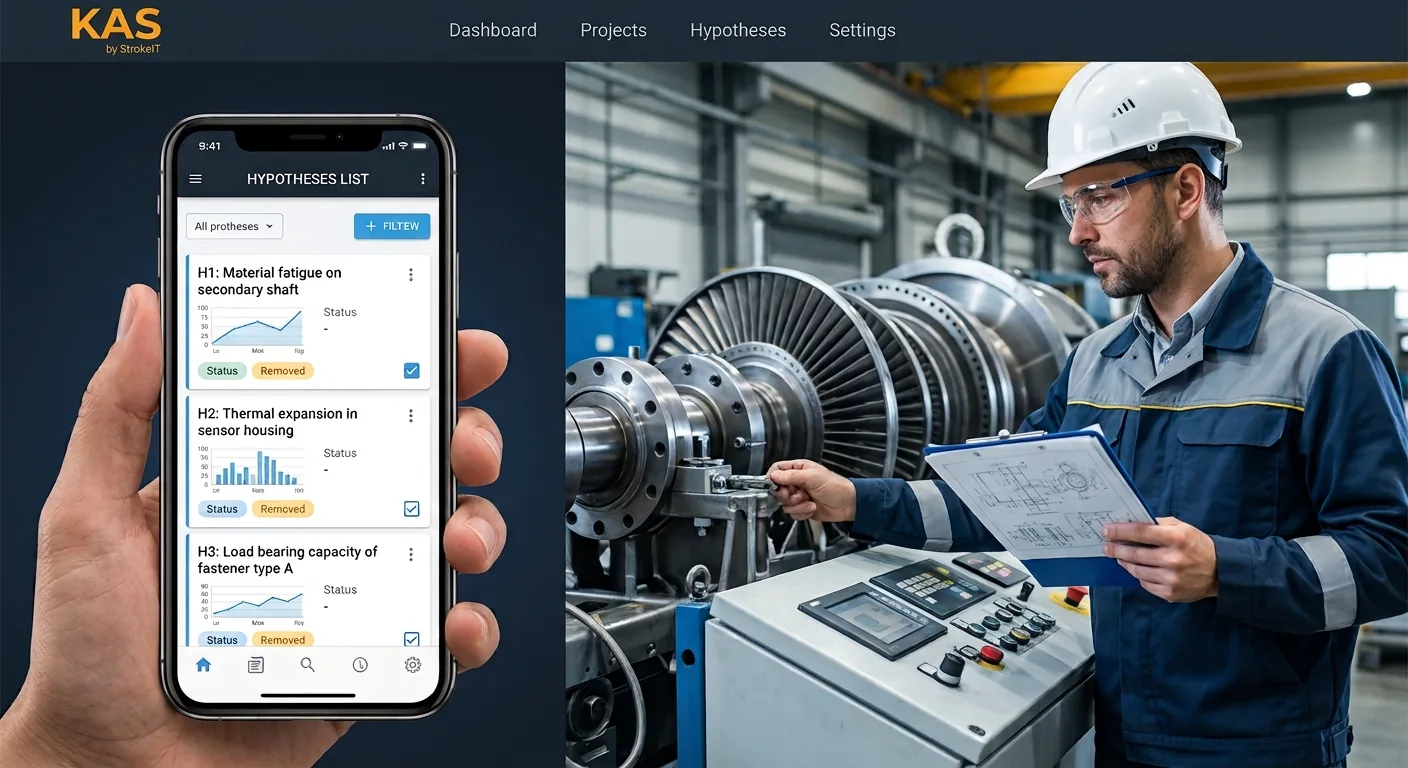
KAS mockup: smartphone showing a prioritised hypothesis list, with an engineer at the test bench in the background
Case study

Decades of engine expertise — trapped in manuals, forums, and the heads of retiring engineers.

When a fault occurs at the test bench, engineers lose hours re-deriving fixes colleagues already solved. The business cost is real: delayed projects, repeated troubleshooting, and risk when expert knowledge leaves.

Role
Product Design & Research, end-to-end — UX ownership within an interdisciplinary hackathon team
Timeline
Origin: 1.5-day hackathon · now in build
Context
Hirth Engines — high-performance two-stroke engines
Output
Research-grounded concept · working prototype · 4 core screens · pitch strategy
The challenge

The problem wasn't discipline. It was friction.

The core insight from the interview: engineers avoid documentation not out of laziness, but because every existing tool adds friction to an already time-pressured job. New login flows, mandatory forms, switching to a desktop app — each one is a reason not to.

So the design goal inverted: not "make them document more," but remove the documentation step entirely — collect spoken explanations passively and feed them into a hypothesis-driven retrieval system.

"Documentation is mostly avoided by the guys. They try to get around it because it costs time."
— Field engineer, Hirth (stakeholder interview)
Point of view

How might we let engineers capture and retrieve expert knowledge without adding a single step to how they already work?

Process · compressed design thinking

One interview, five phases, four screens.

01

Empathize

A 60-minute semi-structured stakeholder interview with a field engineer, mapped to empathy-map quadrants; verbatim quotes extracted for clustering.

02

Define

Empathy map, point-of-view statement and 12 Jobs-to-be-Done — each grounded in interview signal, assumptions flagged where extrapolated.

03

Ideate

How-Might-We questions, feature mapping and explicit scope cuts — kept only what an interview quote or a JTBD could justify.

04

Prototype

Mobile-first, AI-generated screens for four core screens — Problem Input, Hypothesis List, Guided Troubleshooting, Quick Capture — refined directly and built out with the team into a working prototype, usability-tested with the lead engineer across two rounds. A lo-fi step wasn't feasible within the 1.5-day hackathon; UX and development worked asynchronously in parallel.

05

Pitch

UX artifacts translated into a narrative a non-technical executive audience could evaluate — UX ROI framed as an expert-retention strategy.

Deliverables: interview transcript & empathy map · point-of-view statement · 12 Jobs-to-be-Done · How-Might-We → mechanism mapping · product requirements doc with a success-metrics framework · 4-screen concept · two usability-test rounds on the working prototype · pitch narrative.

Empathize

One interview — and what's really behind it.

Interview setup

  • Format: 60 minutes, semi-structured
  • Participant: field engineer (N=1, representative of the primary persona)
  • Setting: at the test bench, during live work
  • Focus: workflows, tool usage, knowledge transfer

Empathy map

Verbatim quotes mapped to the four quadrants — no formal coding scheme, deliberately kept lightweight for a single interview (N=1).

Says
  • "A keyword alone isn't enough — I type full sentences."
  • "I don't trust the copilot — I check it myself, with books and my own head."
Thinks
  • Physics and mechanics don't age like knowledge in medicine — old solutions stay valid.
  • A complex interface guarantees engineers won't use it.
Does
  • Searches books or ChatGPT/Copilot first, then verifies suggestions themselves.
  • Brings unsolved cases to the weekly stand-up; takes photos to show problems.
Feels
  • Distanced from AI answers without evidence — wants to trace origin and author.
  • Frustrated by slow, scattered search; concerned about cost and team buy-in.
Pains
Scattered sourcesNo trust in unverified AINo documentation cultureProblems recur over months/yearsLicence cost as a show-stopper
Gains
Hypothesis list on first inputOverview first, details on demandVoice capture with no extra effortSource & author always visibleMobile access anywhere

Source: Hirth Engines stakeholder interview · empathy map & pains/gains synthesised from the full research artifact.

→ View full empathy map (PDF)
Define

From gut feeling to an evidence-based problem definition.

Point-of-view statement

How might we let engineers capture and retrieve expert knowledge without adding a single step to how they already work?

12 Jobs-to-be-Done

Every job is anchored to a verbatim interview quote, translated into the JTBD format "When … I want to … so that …".

JTBD spotlight — 2 of 12 in detail

JTBD 01 Problem-solving

Prioritised list of causes

Situation"When a fault occurs that I don't yet recognise — for example scratches on the piston —"

Motivation"I want to see a prioritised list of possible causes right away, instead of starting from zero,"

Outcome"so that I can test the most likely hypothesis directly, instead of losing hours re-deriving it."

JTBD 07 Knowledge capture

Voice note on the spot

Situation"When I'm explaining to a colleague right now how I solved a problem,"

Motivation"I want to be able to record that in the moment, without writing anything down separately,"

Outcome"so that I document it without interrupting my workflow or losing time."

All 12 Jobs-to-be-Done

Click to expand — each job in full Situation / Motivation / Outcome format. Grouped into 5 themes: Problem-solving (3) · Information access (3) · Knowledge capture (2) · Trust & validation (2) · Access & adoption (2).

JTBD 01Problem-solvingPrioritised list of causes, instantly

Situation"When a fault occurs that I don't yet recognise — for example scratches on the piston —"

Motivation"I want to see a prioritised list of possible causes right away, instead of starting from zero,"

Outcome"so that I can test the most likely hypothesis directly, instead of losing hours re-deriving it."

JTBD 02Problem-solvingRule out what's already been tried

Situation"When I ask the system for a solution,"

Motivation"I want to state right away what I've already tried or ruled out,"

Outcome"so that I don't get suggestions I've already tested, and save time."

JTBD 03Problem-solvingStep-by-step troubleshooting

Situation"When I've settled on a likely cause,"

Motivation"I want a guided step-by-step walkthrough instead of a whole manual,"

Outcome"so that I proceed in a structured way, without reading through irrelevant pages."

JTBD 04Information accessShort preview before full depth

Situation"When I get a first answer from the system,"

Motivation"I want to see a short preview before committing to the full depth,"

Outcome"so that I can quickly decide if it's even relevant, without reading long texts."

JTBD 05Information accessAll sources in one place

Situation"When I'm pursuing a cause,"

Motivation"I want linked manuals, diagrams and reports in one place,"

Outcome"so that I stop switching between books, folders and separate AI tools."

JTBD 06Information accessPhoto diagnosis instead of text

Situation"When I have a visible defect in front of me,"

Motivation"I want to upload a photo and get a visual assessment,"

Outcome"so that I communicate the problem faster than describing it in words."

JTBD 07Knowledge captureVoice note on the spot

Situation"When I'm explaining to a colleague right now how I solved a problem,"

Motivation"I want to be able to record that in the moment, without writing anything down separately,"

Outcome"so that I document it without interrupting my workflow or losing time."

JTBD 08Knowledge captureReuse existing slides

Situation"When I have a summary slide after troubleshooting,"

Motivation"I want to simply upload it and have the system parse it,"

Outcome"so that I contribute knowledge without manually retyping content."

JTBD 09Trust & validationSource & author per answer

Situation"When the system gives me an answer,"

Motivation"I want to see who it came from and what it's based on,"

Outcome"so that I can judge it and, if in doubt, clarify directly with the source."

JTBD 10Trust & validationFlag & correct errors

Situation"When I find incorrect or outdated information in the system,"

Motivation"I want to be able to flag and correct it, traceable back to the source,"

Outcome"so that the knowledge base stays reliable for the whole team."

JTBD 11Access & adoptionUsable on mobile, without friction

Situation"When I'm at the test bench or out in the field,"

Motivation"I want to use the system from my phone, without detours,"

Outcome"so that I get help without having to go back to a desk."

JTBD 12Access & adoptionFull sentences, not keywords

Situation"When I describe my problem to the system,"

Motivation"I want to be able to do that in full sentences, not just keywords,"

Outcome"so that I convey nuances the system would otherwise miss."

User journey
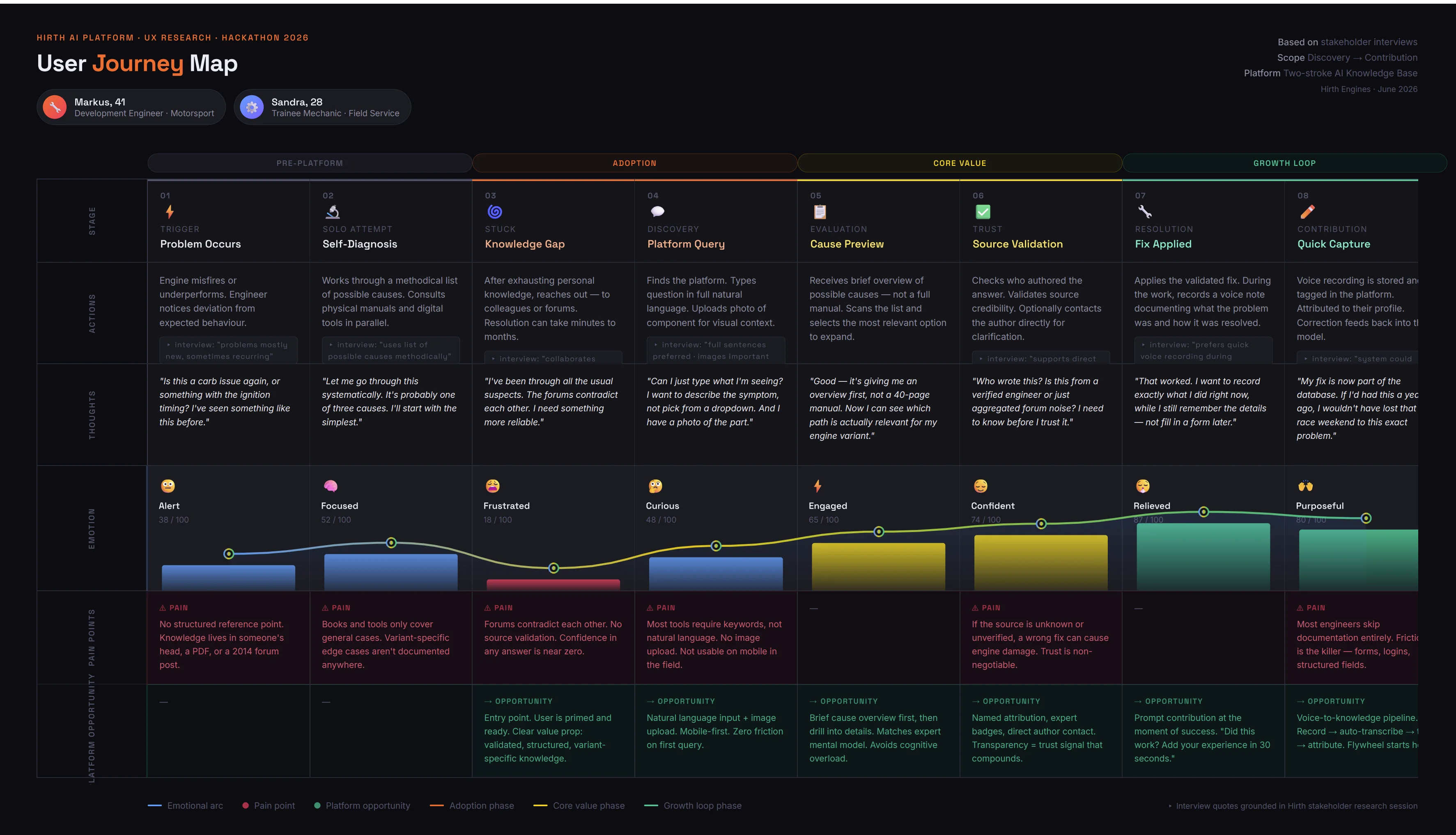
User journey — Hirth AI Platform
From question to mechanism

Each How-Might-We question led to a concrete design move.

HMW 1

Let engineers speak a solution and have it structured automatically?

→ MechanismVoice capture + NLP auto-tagging.
HMW 2

Make search feel like a colleague running through possibilities?

→ MechanismPrioritised hypothesis cards instead of a search box.
HMW 3

Get documentation without anyone having to document?

→ MechanismPassive capture after a solved case — auto-structured and attached.
HMW 4

Signal confidence so engineers know when to trust the system?

→ MechanismExpert-correction reliability tiers (high / medium / low).
Ideate

From problem space to solution space — structured and evidenced.

Feature mapping

Every kept feature traces back to an HMW and a JTBD.

FeatureHMWJTBD
Voice capture + NLPSpeak & structure a solution07 · Voice note on the spot
Hypothesis cardsSearch like a colleague01 · Prioritised list of causes
Passive captureDocumentation without documenting07 · Voice note on the spot
Reliability tiersSignal confidence09 · Source & author per answer

Scope cuts

  • Gamification: No interview signal, no JTBD — cut.
  • Mandatory tagging: Adds friction — cut.
  • Knowledge graph: Low mobile utility — deferred.
Prototype

Three prototypes, developed in parallel — no lo-fi step, straight to AI-generated screens.

UX Design built two clickable no-code prototypes (Base44, Replit) for feature exploration and inspirational execution; the dev team developed a working MVP in parallel, focused on technical feasibility — asynchronous rather than sequential.

Wireframing approach

  • Fidelity: AI-generated screens from the start → refined, fleshed out, validated — no lo-fi step, since Lean UX left no time for it within the 1.5-day hackathon
  • Tools: Claude, ChatGPT, Replit, Base44 — AI-assisted screen generation instead of a classic wireframing tool
  • UX and development worked asynchronously in parallel rather than sequentially
  • Final design standards are only now being adopted, in the follow-up project
  • Screen flow: Problem Input → Hypothesis List → Guided Troubleshooting → Quick Capture → (solves case → re-ranks the next hypothesis list)

4 core screens in detail

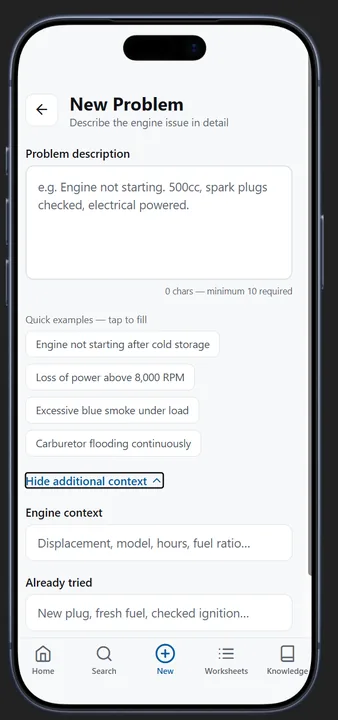
  • 01 Problem Input: Switchable input modes (text/voice/photo) in the same field; free text instead of form fields, so context isn't lost.
  • 02 Hypothesis List: Cards collapsed by default, sorted by reliability tier; tap opens the detail view.
  • 03 Quick Capture: One-tap recording right after completing a step; transcription and structuring happen in the background, with no extra form.
  • 04 Knowledge Graph: Visualisation of concept nodes, relationships and source evidence in the detail panel — built and tested as a bonus within the hackathon timeframe, not part of the focused 4-screen core journey.

MVP — Coded Prototype

Development

Focus: technical functionality and feasibility.

01Search for a solution

Ask KAS to find information and work along a hypothesis based work progress.

02Knowledge graph

Highlight data connections as graphical overview.

03Add knowledge

Record a solution process, put engineering data into the system.

Focus: feature exploration and inspirational execution, independent of technical constraints.

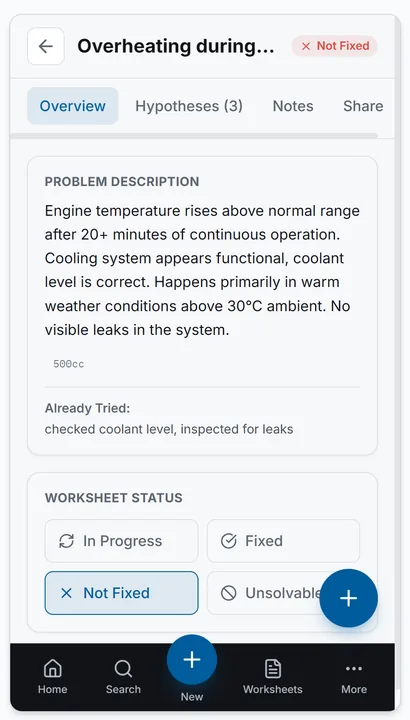
Base44 — problem detail view with status and worksheet options
Problem detail view: status, description, worksheet options.
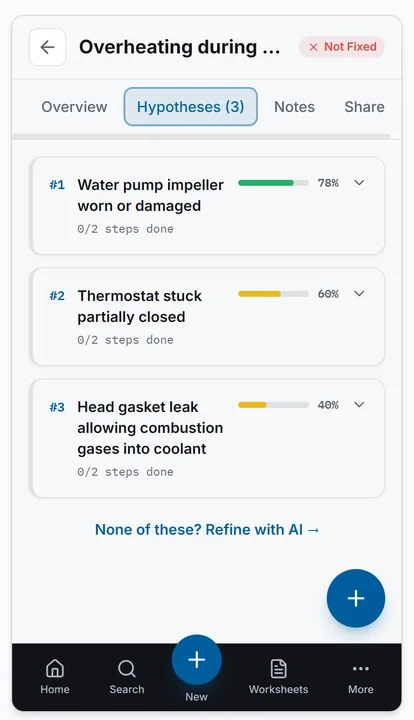
Base44 — hypothesis list sorted by likelihood
Hypothesis list, sorted by likelihood — including an option to generate more with AI.
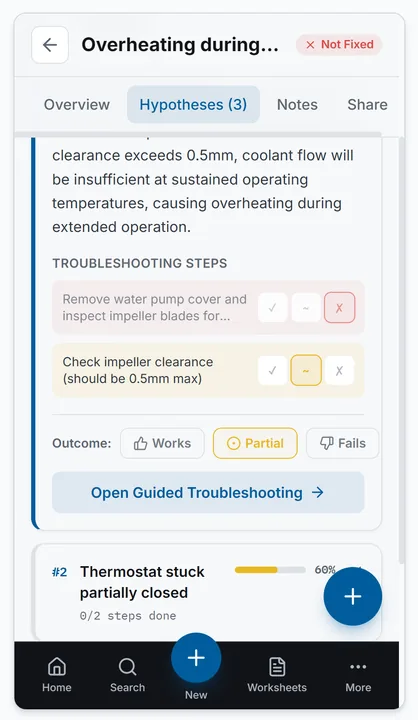
Base44 — guided troubleshooting with step-by-step outcomes
Guided troubleshooting: steps per hypothesis, with outcome feedback (Works/Partial/Fails).
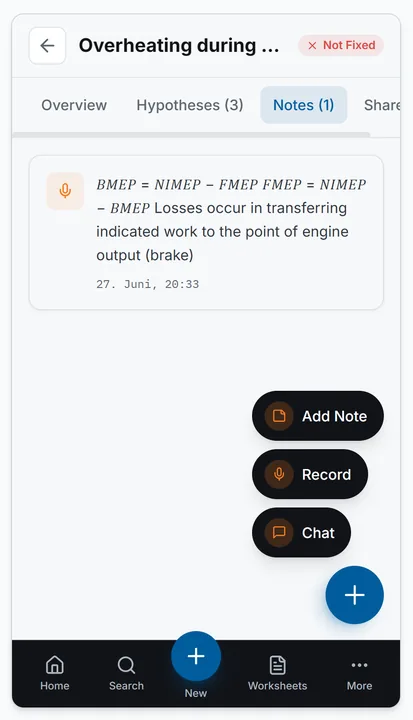
Base44 — notes tab with voice recording, chat and text
Notes tab: capture voice, chat or text directly on the case.
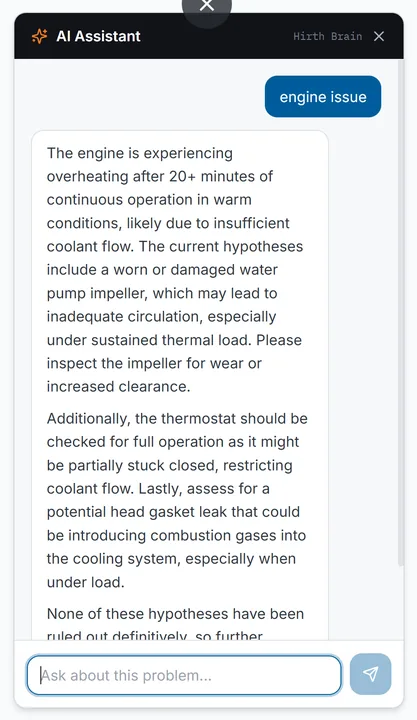
Base44 — AI assistant in chat format
AI assistant answers questions about the case in chat format.
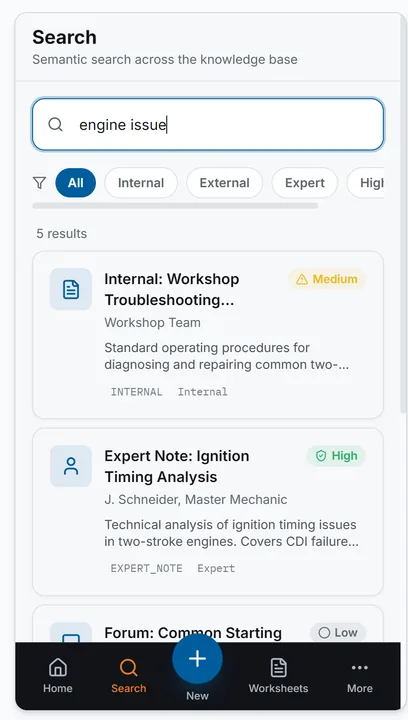
Base44 — semantic search across the knowledge base
Semantic search across the knowledge base, with reliability badges.
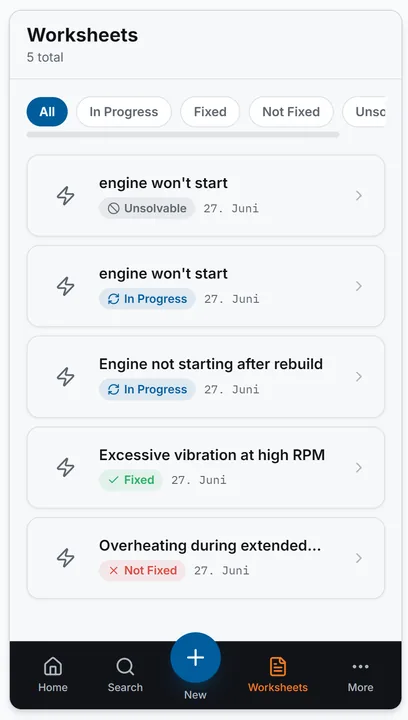
Base44 — worksheet overview with status filters
Worksheet overview with status filters (In Progress, Fixed, Not Fixed, Unsolvable).

Focus: alternative interaction patterns and navigation structure.

Replit prototype video.
Replit — creating a new problem with quick examples
Creating a new problem: free text, quick examples and optional context.
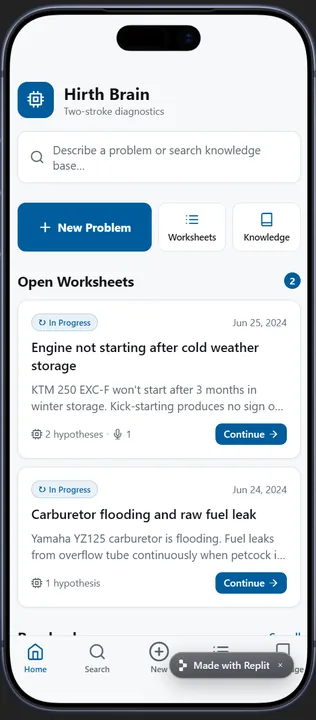
Replit — home screen with open worksheets
Home screen with open worksheets and direct access to search and the knowledge base.
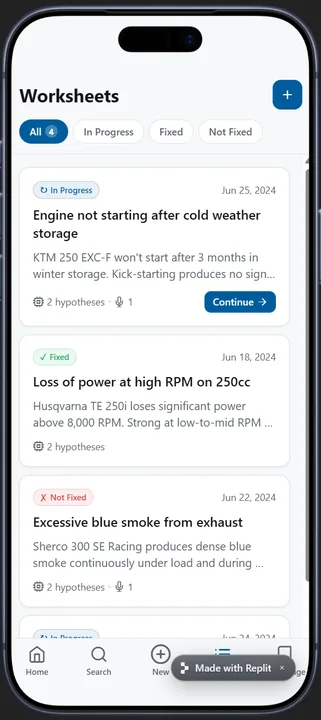
Replit — worksheet list with status and date
Worksheet list with status and date per case.
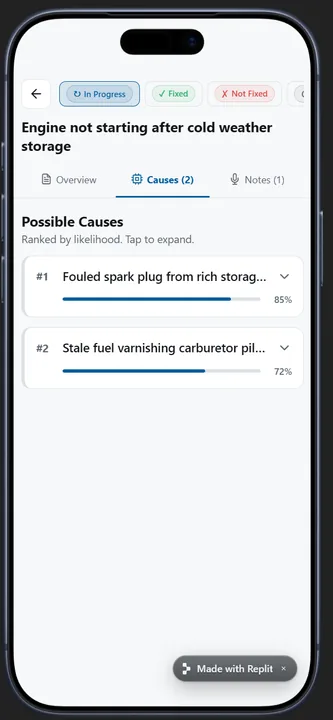
Replit — cause overview sorted by likelihood
Cause overview, sorted by likelihood.
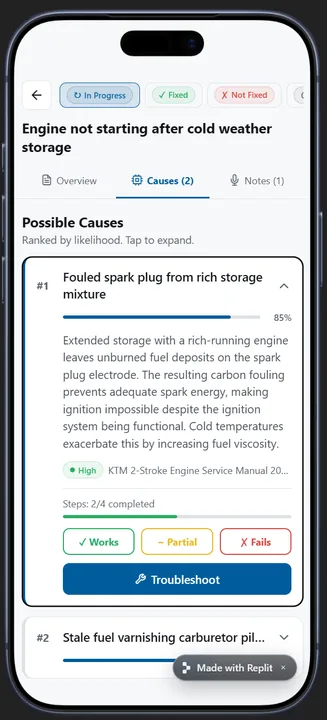
Replit — expanded hypothesis with source and progress
Expanded hypothesis with source citation, progress and troubleshoot action.
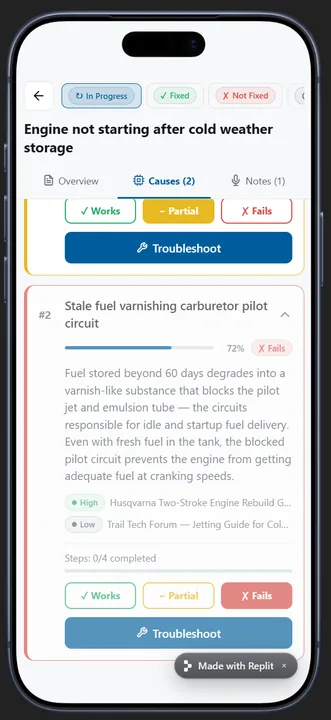
Replit — failed hypothesis documented
Failed hypothesis documented — next hypothesis visible right below.
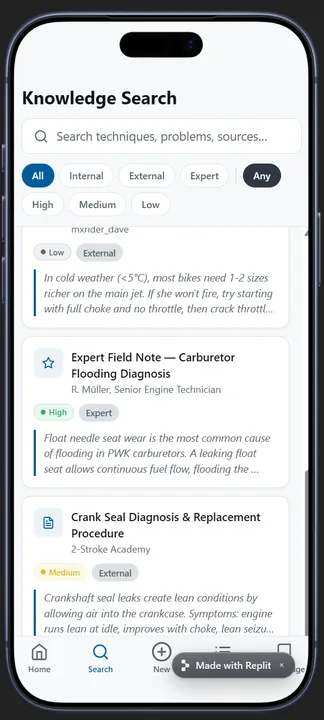
Replit — knowledge search with filters
Knowledge search with filters by source and reliability.
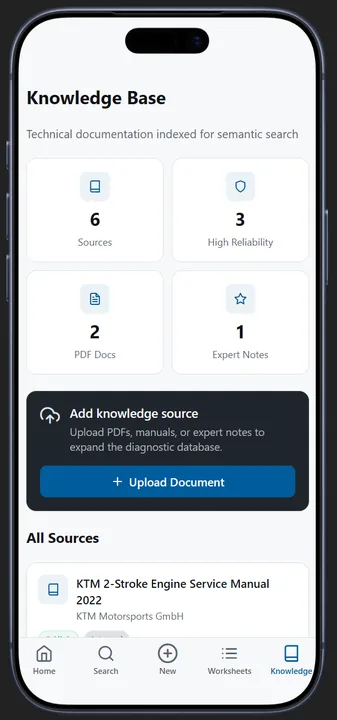
Replit — knowledge base overview
Knowledge base overview: sources, PDF documents and expert notes.
Pitch

UX artifacts translated into a narrative for a non-technical audience.

Pitch structure

  • Act 1 — Problem: A concrete scene at the test bench instead of a bullet-point slide — a technician in front of a stalled engine, the clock running.
  • Act 2 — Solution: Live-demo moment: the engineer speaks the case into their phone in one full sentence — the system returns prioritised hypotheses instead of a hit list.
  • Act 3 — Proof: Two real usability-test rounds with the lead engineer on the working prototype, including fixes shipped directly — not a purely hypothetical concept.
  • Act 4 — ROI: Cost-efficient architecture (~€20–60/month) positioned directly against the €20,000/year pain threshold named in the interview; the expert-correction flywheel as a differentiator competitors can't easily copy.

UX ROI as strategy

The pitch didn't sell UX as aesthetics but as risk reduction: every feature was traced directly back to an interview quote, every cost decision weighed directly against the named pain threshold. For a non-technical executive audience, the product advantage was translated into business risk — knowledge loss on staff turnover, delayed projects, repeated troubleshooting — rather than interface details.

Pitch deck

Solution

KAS

a mobile-first knowledge assistant in four screens.

The moat isn't the AI. It's the expert-correction flywheel and the zero-friction capture loop that competitors can't easily copy.

01
02
03
04
05
› › › › ›
⟳Expert
corrections
01
Capture

Voice, photo or text — in the moment of solving, with no form.

02
Structure

Auto-tagging and NLP classification organise the input.

03
Retrieve

Hypothesis ranking by reliability tier for the next query.

04
Correct

Engineer marks a step done / failed / partial — the human stays in the loop.

05
Retrain

Corrections flow back into the model — the flywheel spins faster.

Outcome & impact

What the concept aims to achieve — and what's already achieved.

Deliverables

  • 4 core screens (mobile-first)
  • Working prototype
  • Pitch narrative & strategy
  • Interview transcript, empathy map & 12 Jobs-to-be-Done

Business impact (projections)

  • < 2 min to first hypothesis
  • < 30 sec capture after a fix
  • 20–40% faster resolution within 6 months
  • Knowledge retention on staff turnover — less dependence on individuals
Next step
6-month implementation plan — pilot study
Status
Concept validated · in build
Team
UX owned end-to-end within the hackathon
Differentiator
Expert-correction flywheel & zero-friction capture loop
Design decisions

Every kept feature traces to a quote. Every cut traces to its absence.

✓ Kept
Hypothesis list over search box

Engineers reason forward from causes, not backward from keywords.

✓ Kept
Passive voice capture

Removes the documentation step entirely.

✓ Kept
Reliability tiers per card

Trust comes from traceable, validated sources.

✓ Kept
Cost-efficient architecture (~€20–60/month)

Direct response to the €20,000/year cost ceiling named in the interview — otherwise the project dies.

✕ Cut
Gamification (badges / points)

No interview signal, no supporting JTBD.

✕ Cut
Mandatory tagging form (manual tagging after every capture)

Adds friction to the capture flow.

◷ Deferred
Knowledge-graph visualization

Originally deferred from the focused 4-screen concept: low mobile utility, no validated job for the primary persona. Room for it turned up within the 1.5-day timeframe after all — built and tested with the lead engineer. Still secondary for the mobile core, but part of the working prototype.

Progressive disclosureZero-friction captureTrust through transparencyMobile-firstHypothesis-drivenSession continuity
Validation & honesty

What's grounded in research — and what's an assumption.

Born in a hackathon and usability-tested across two rounds on the working prototype — here's what's evidenced and what's still an assumption.

Research-grounded

  • Stakeholder interview (validated, N=1)
  • Transcript analysis & empathy map
  • 12 Jobs-to-be-Done, quote-anchored
  • The hypothesis-driven UI principle — straight from an interview quote, not intuition
  • Two usability-test rounds with the lead engineer from the interview on the working prototype — interface fixes (jargon cleanup, reduced file-list clutter, among others) shipped directly

Assumption-tagged

  • Personas (proto, N=1 extrapolated)
  • Passive-capture technical feasibility
  • Business metrics — hypothetical projections only

Research-output ratio: 1 interview → 12 JTBD → 4 screens → working prototype. Targets (< 2 min to first hypothesis, < 30 s capture, 20–40% faster resolution within 6 months) are pitch projections, flagged [assumption] until a pilot study.

Status & outlook

Beyond the hackathon — now in build.

The 1.5-day concept has become an active initiative.

Reflection

In highly technical contexts, the designer's job isn't to invent features — it's to remove the ones that make experts' lives harder. Every kept decision here traces back to an interview quote; every cut, to the absence of one.