UX Research & Concept · Prefabricated Housing · 1 Designer, 3 Devs · Hackathon · 2026 · 1.5 days

One scan for complete outfitting, zero extra work.

After the showroom consultation, the advisor had to manually transfer handwritten notes into three separate systems. Scan2Configure turns scanning into an accurate, complete outfitting, with no rework.
Case study

Once captured, synced into three systems

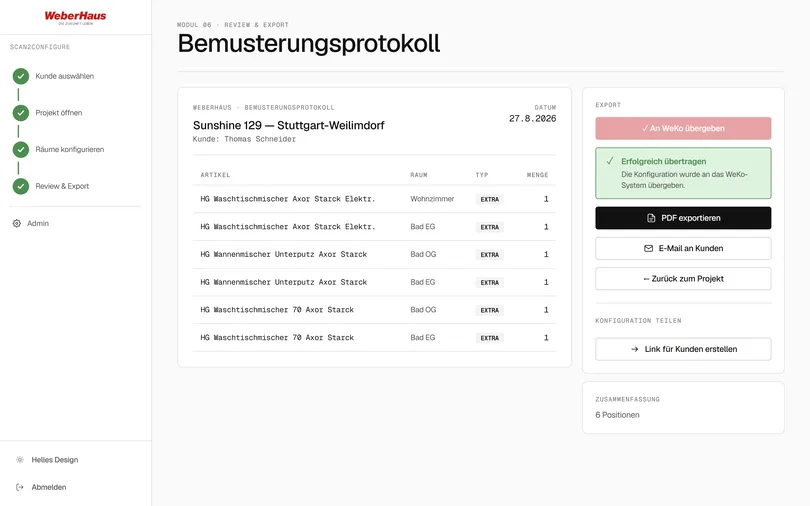
Scan2Configure digitizes the physical outfitting at WeberHaus. Instead of noting preferences by hand and transferring them into multiple systems afterward, the advisor captures them by scan — right at the exhibit, in the flow of conversation.

RoleUX/Product Design & Research
End-to-end
TimelineReal challenge
1.5 days
ClientWeberHaus
Prefab home manufacturer
OutputConcept & roadmap
3 implementation phases

The Challenge

Two root problems slow down the outfitting today:

  • › Paper-based capture — time-consuming, error-prone, no control, no access to information during the consultation.
  • › Separate systems — even more effort: transcription errors, triple the work, no availability during the selection session.

Requirement: reduce effort and errors — from clipboard notes to digital scanner capture. The result: an application with fully integrated synchronization across all three systems.

On top of that: for details and special requests, the advisor had to physically leave the consultation — the catalog and other documents were only accessible in the office, not in the selection hall.

„At the sample, the customer and I move fast — but afterward I re-enter every single line into three systems by hand."
Synthesized advisor hypothesis · no interview transcript Assumption/unvalidated

Problem layers

Layer 1 — during the conversation

The handwritten notes on the selection were error-prone; special requests required a trip to the office.

Layer 2 — after the conversation Core problem

Manual, unchecked, repeated transfer into three separate systems.

Layer 3 — after closing optional

The customer sometimes waited several weeks for the contract documents — on paper, sent by mail (risk of loss); further time passed until the signed copy was returned.

HMW

How might we capture the outfitting so that correct, complete data lands in every system without manual post-processing?

Process

Five phases from understanding to roadmap

1

Understand

Mapped the current selection process along the advisor's role: clipboard capture, data only in the office, manual repeated transfer into three target systems.

2

Competition

Surveyed the configurator and sampling landscape via a rapid AI analysis (hackathon time pressure): Cyncly, palette CAD, Roomle, Tulip, automotive configurators.

3

Focus

Reframed from a "capture tool" to "frictionless scan-as-capture"; sharpened the selection advisor persona.

4

Design

Designed the scan-to-cart flow, live dependency check, price feedback, and sync logic as an MVP.

5

Roadmap

Structured scope into 3 phases — with explicit prioritization reasoning for what comes first and what waits.

View all 7 user journeys
01

Start the consultation

  1. Advisor logs in (email + password)
  2. Search for the customer by name/email/customer number, or create a new one
  3. Create or open a consultation project
  4. Load or create the house project (series, address, floor plan)

Goal: Fast entry into the consultation with no technical hurdles.

02

Showroom walkthrough

Core flow
  1. Advisor selects the target room (e.g. "upstairs bathroom")
  2. Point the camera at the QR code / scan the GTIN
  3. Item appears with image, name, availability
  4. Confirm installation location (pre-selected)
  5. Check quantity (auto-calculated for area-based materials)
  6. Choose category: Base / Upgrade / Extra
  7. Tap "Add to cart"
  8. Optionally add a note, photo, or voice memo
  9. Scan the next item

Goal: Fast, error-free capture within the flow of conversation.

03

Dependency check

  1. Item is added to the cart
  2. System automatically checks: is required accessory missing?
  3. If accessory is missing: warning with explanation and a direct "Add" option
  4. If incompatible: warning with explanation, advisor decides
  5. Advisor can knowingly dismiss the warning or resolve it

Goal: No incomplete configurations, but no hard block.

04

Manage the cart

  1. Group the cart by room or category
  2. View item: image, name, item number, category, quantity
  3. Adjust quantity afterward
  4. Change installation location
  5. See availability warnings
  6. Upgrades show which base item they replace

Goal: Full control over the configuration.

05

Review & export

  1. Review summary: all rooms, all items, special requests
  2. Confirm availability warnings
  3. Customer signature (tap-to-sign)
  4. Export as CSV or API payload for WeKo
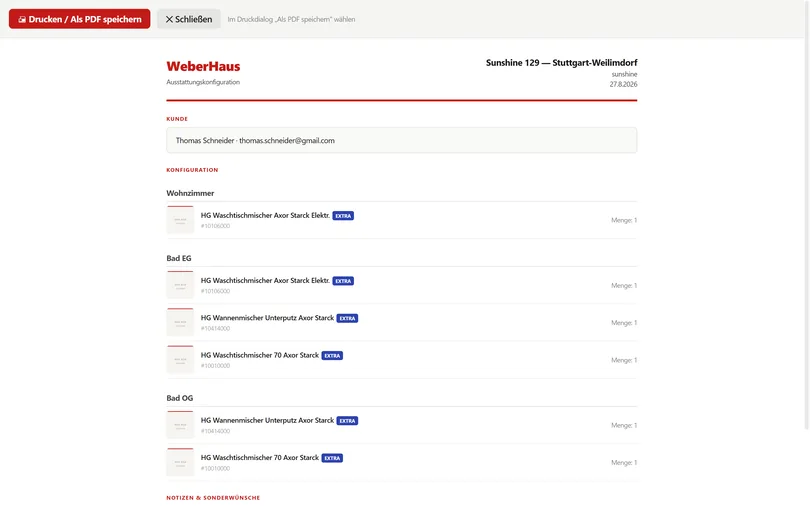
  5. Generate PDF (no prices, with WeberHaus branding)
  6. Send PDF to the customer by email

Goal: Close the consultation with a professional handover record.

06

Customer views the configuration at home

  1. Advisor generates a share link (valid 30 days)
  2. Customer opens the link on smartphone/desktop (no login)
  3. Sees all rooms, items with images, special requests
  4. No prices visible, read-only

Goal: Customer can discuss decisions at their own pace.

07

Offline mode

Phase 2
  1. "Prepare showroom": download the catalog locally
  2. Consultation runs offline — all entries saved locally
  3. When Wi-Fi is available: automatic background sync
  4. Status indicator: online/offline, number of unsynced entries

Goal: Consultation works even without a network connection.

Critical path — from Journey 02: from scan to captured note Target: < 5 interactions

The five active interactions from the nine-step showroom walkthrough (steps 2, 4, 6, 7, 8) — steps where the system reacts automatically (recognizing the item, calculating quantity) don't count as an interaction.

1
Scan
Capture QR/GTIN
2
Confirm location
pre-selected
3
Choose category
Base/Upgrade/Extra
4
Add to cart
one tap
5
Note
optional

Competition

Where Scan2Configure fits in

Two separate competitive fields: fixtures/sampling tools (B2B, like Scan2Configure itself) and customer-facing 3D house configurators (end-customer self-service, as WeberHaus already offers today).

B2B fixtures & sampling tools Assumption: AI-generated

CynclyFeature-complete, but slow — not tailored to the fixtures-selection workflow.
palette CADProfessional planning, not optimized for live consultations.
TulipTablet-optimized, offline-capable — but generic, not built for home consultations.

Prefab-home configurators for end customers Market comparison

Rank 1

Büdenbender Haus

Real-time price display throughout the entire planning process — instant, transparent cost control.

—

Haas Haus

Configurator 2.0 with AR feature: photorealistic 3D projection of the house onto your own plot.

—

Living Haus

Intuitive to use, playful experimentation, save & PDF export.

Rank 3

Almondia

Wide range of configurable house types — semi-detached, terraced, bungalow.

None of the four is built for the advisor-led showroom moment — that's exactly where Scan2Configure comes in, not in end-customer self-service.

Findings

Positioning & market gaps

Distilled from the competitive analysis — hypotheses, not a tested positioning. Assumption/unvalidated

„Faster than paper."Advisor adoption threshold
„The customer sees the price while deciding."Customer value
„One entry, three systems."Business case

Scan2Configure isn't another configurator — it's the missing handoff layer between the physical showroom and the digital systems that today have to be manually filled in afterward.

+ Opportunities

  • Pre-selection at home (companion app)
  • Home & living expos / furniture showrooms as touchpoints
  • Visual recognition instead of QR (mid-term)
  • Licensing to partner showrooms

– Threats

  • WeKo/CAD vendors with unstable APIs
  • Advisors won't adopt the app if the first version is weak
  • Data-protection requirements for customer data on the tablet — at its core not a new requirement, since the same data already lives in existing systems
  • Internal stakeholders dilute the focus with additional feature requests

Market gaps / differentiation

Insights

Four insights, four design responses

evidenced01

The advisor works with the object and the screen — today, separately.

Consulting at the sample and working the systems are two separate worlds; the follow-up and office work around the selection eats up the time.

→ One tool brings both together: scan at the exhibit, the system fills itself in — rework is minimized.

researched requirement02

Dependencies are the pain point, not the volume.

Product dependencies need to be checked — in the showroom, the advisor has no way to do this and must rely entirely on their own knowledge and experience (illustrative example: flooring ↔ underfloor heating).

→ Live dependency check on add; conflicts are explained, not just flagged.

Product decision03

Three systems, one source of truth.

WeKo, CAD, and Designer are each maintained by hand today. Pure digitization (scanning instead of a clipboard) would only solve a small part — the real lever is bringing them together.

→ Deliberately chosen: one cart as the single source of truth; sync status visible per system, push instead of retyping.

Assumption/unvalidated04

Live consultations can't tolerate load times.

Price and feasibility feedback should arrive at conversational speed — assumed as a design principle, not tested.

→ Optimistic UI with an instant price delta; sync happens in the background, errors are non-blocking.

Personas

Who we're designing for

Two personas, derived from requirements documents and industry knowledge — not from conducted interviews. Assumption/unvalidated

Primary persona
Selection Advisor
Fixtures advisor at the WeberHaus show home
proto
TechnologyTablet — iPad or Android, MDM-managed.
ExperienceVaries · onboarding required in < 30 min.
ContextTablet-based, in the show home, during the live customer session.
TasksAccompany customers, create projects, scan items, capture notes & special requests, present the summary.
NeedCapture outfittings within the flow of conversation — no media break, no rework afterward.
TriggerAn extra capture step, load times, unclear product dependencies in front of the customer.
Pain Points
  • Handwritten notes have to be transferred into three systems afterward
  • Special requests require a trip to the office for catalog documents
  • No control during the consultation — errors only surface later
  • Customer waits while the advisor documents
SuccessScan-to-cart in < 5 interactions · no blocking load states · all data available at the point of consultation.

„The sample is right in front of us — the system has to follow that, not the other way around." Assumption/unvalidated

Secondary persona
Homeowner / Customer
Homebuyer · passive / co-viewer
proto
ContextMakes fixtures decisions, together with the advisor in the showroom.
TasksMake fixtures decisions, understand the configuration, build trust in the consultation.
NeedUnderstand what was chosen and what it costs — trust in the consultation.
TriggerLack of transparency; "we'll calculate that later" instead of instant clarity.
Pain Points
  • "We'll calculate that later" instead of instant clarity
  • No understanding of what's already included in the standard package
  • Waiting for contract documents — sometimes weeks by mail
Role in systemNot an active user of the advisor app — a co-viewer on the advisor's tablet (Phase-2 feature "Customer Mirror"). Receives a PDF summary and/or a share link at the end.

„I want to see what my decision costs — right now." Assumption/unvalidated

Scan2Configure is explicitly not a customer-facing self-service tool. The customer is a co-viewer (Phase-2 feature "Customer Mirror"), not a user.

Journey: Before / After

From consultation to closing, two completely different emotional states

Current vs. target state, side by side — including the emotional shift from consultation to closing. Assumption/unvalidated

AS-IS — today
😐PreparationPrepare the clipboard, open the WeKo file
🙂ConsultationExhibits with no live price or dependencies
😰SelectionDependencies unclear — does the faucet fit the basin?
😰Special requestsTrip to the office, flipping through catalogs
😫DocumentationHandwriting — high risk of error
😫Follow-upRetyping into WeKo, reconciling with CAD
😫Manufacturer inquiryWait time, revisions
😫UpdateManually re-entering the response into WeKo & CAD
😫QuoteManually assembled, follow-up phone calls
⏳ClosingWaiting for the signed copy to arrive by mail
TO-BE — with Scan2Configure
🙂PreparationScan QR code/NFC, case loads
🙂ConsultationPrices & variants right on the tablet
🤩Live captureStraight into the digital cart
😎SyncOne click — WeKo & 3D Designer
👀3D visualizationReviewed live, together with the customer
🥳QuoteGenerated instantly, released right away
😎Manufacturer inquiryChecked & forwarded immediately
🔄UpdateResponse updates the cart automatically
✍️ClosingDigital customer signature

The Solution

The flow, screen by screen

Scan the exhibit — one tap adds it to the cart.

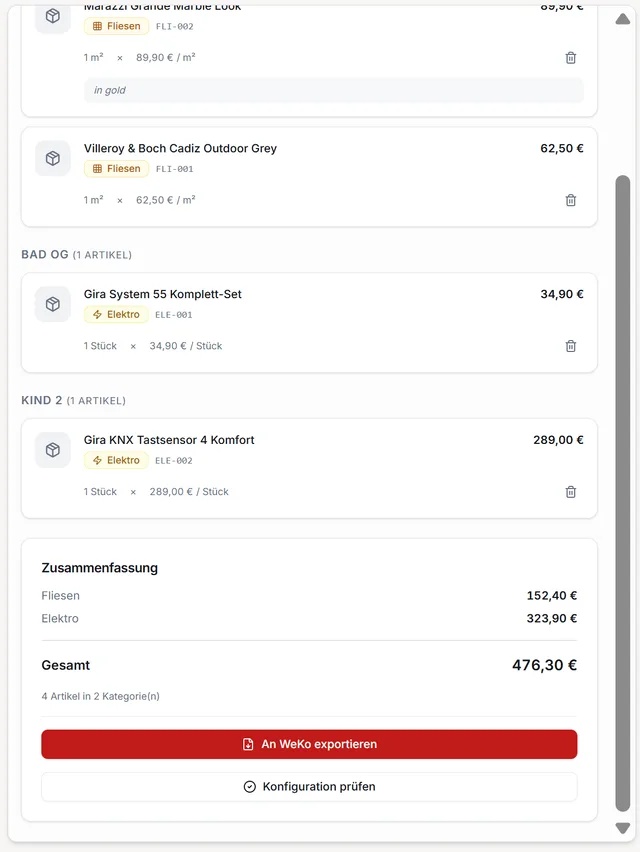
Item list with details and special requests within the flow of conversation

Look up details & special requests right at the point of consultation — all data digital, no trip to the office.

Conflict dialog: incompatible item dependency with an explanation and resolution option

A dependency conflict is explained and offered a resolution.

Sync overview with status badges for WeKo, CAD, and myWeberHaus Designer

Sync status per target system: WeKo, CAD, Designer.

Session summary as a PDF export

The record, exported as a PDF handout to take home.

One cart as the single source of truth — the three systems follow it, instead of being retyped.

Concept prototype: one central cart as the shared source of truth for WeKo, CAD, and Designer
Concept prototype (Lovable) — one cart, three sync targets

Information Architecture

One advisor flow (customer search → project → scan → cart → review), a separate admin path for back office and catalog maintenance.

Module overview — 15 features

Foundation (00)
├─ MVP core (01–06)
├─ 01 Customer search MVP
├─ 02 Project & house view MVP
├─ 03 myWeberHaus import MVP
├─ 04 Scan & configure MVP
├─ 05 Cart management MVP
└─ 06 Review & WeKo export MVP
└─ WOW features (07–15)
├─ 07 Real-time visualization WOW
├─ 08 Dependency validation WOW
├─ 09 Completeness check WOW
├─ 10 Customer sharing WOW
├─ 11 Notes & special requests WOW
├─ 12 PDF export & email WOW
├─ 13 Offline sync WOW
├─ 14 Admin interface WOW
└─ 15 Statistics & reports WOW

Navigation structure

Primary — advisor app
Home → Project → Scan → Cart → Review
  • Home: customer search
  • Project view: house data, floor plan, cart summary
  • Scan tab: QR/NFC/manual, scan history
  • Cart: grouped by room/category, validation panel
  • Review: summary, signature, export
Secondary — admin
Separate usage path
  • Catalog management
  • QR code generator
  • Project overview
  • Statistics

Data flow & single source of truth

Create customer→ Create project→ Configure house
Scan item→ Cart→ Validation→ Review→ Export
↳ Notes↳ Dependencies↳ Special requests

Prioritization

What comes first — and why

Derived from user sentiment and strategic analysis, each feature assigned to a rollout phase using three guiding questions. Logic is traceable, sequence untested

01

Scan → Cart → Variant in < 8 sec.

Hard core — nothing after this works without it.

02

Live price display from WeKo

Highest perceived value for customer and advisor.

03

Customer-record binding

The cart needs an owner.

04

One-click sync to WeKo

Directly delivers on the 80%-rework hypothesis.

05

Soft validation — top-20% dependencies

Pareto principle instead of a full rule engine.

06

Customer Mirror display

A second screen for the customer — Phase-2 candidate.

Which guiding question decides which rollout phase

→ MVPDoes it replace paper in the live consultation?
→ Phase 2Does it strengthen the customer's trust during the appointment?
→ Phase 3Does it extend the tool to new touchpoints or business models?

Explicitly NOT in the MVP

3D-Designer live syncCustomer-facing companion appAI image recognition instead of QRFull rule engineOffline-FirstAR overlaysMulti-tenant SaaSGenerative AI style suggestions

Decisions

What stayed, what was cut, what's waiting

Scan-to-cart as the MVP core

Directly resolves the media break; highest job-to-be-done value.

✓ Kept

WeKo sync in the MVP

Calculation is the first system the live consultation touches.

✓ Kept

Customer Mirror display

Strong value, but hardware-/setup-dependent; not MVP-critical.

⏱ Backlog · to review

Live 3D-Designer sync

High technical coupling; only makes sense once the cart-as-source-of-truth is stable.

⏱ Deferred · Phase 2

Gamification / points for advisors

No signal from the groundwork, not a real job-to-be-done; distracts from the flow of conversation.

Illustration of a points system (discarded idea)✕ Cut
Scan instead of documenting by hand The customer stays the focus Explain dependencies Single Source of Truth Pace within the live conversation
Live 3D-Designer sync — deferred to Phase 2

Usability Evaluation

Heuristic evaluation of the prototype

Expert review against Nielsen's 10 heuristics — not a study with real users.

+ Strengths

  • Wizard progress & sync status clearly visible
  • Real-time validation prevents downstream errors
  • Consistent design tokens & icon language
  • Voice input, high contrast, touch targets ≥44px

– Gaps

  • No undo after removing a cart item
  • Generic error messages with no diagnostic detail
  • No onboarding for new advisors
  • Two parallel implementations could drift apart
Heuristic evaluation — 10 Nielsen heuristics

What already works, and what's missing in the current implementation.

Heuristic
Strengths
Weaknesses
01System status
  • Wizard progress visible
  • Sync status indicator
  • Status badges per project
  • No granular loading indicators after a scan
  • Sync progress with no %/count
02Match between system and the real world
  • Emoji floor plan per room type
  • Realistic 3D of the exterior view
  • Technical item codes with no explanation
  • "Artikel" (code) vs. "Product" (UI) inconsistent
03User control and freedom
  • Swipe to remove cart items
  • Notes are editable
  • No undo after removing
  • Export not reversible
04Consistency and standards
  • Shared design tokens
  • Unified icon set (2px stroke)
  • Two parallel implementations can drift apart
  • Status-badge styles vary slightly
05Error prevention
  • Real-time dependency validation
  • Required-field checking
  • Generic error for an unrecognized barcode
  • No protection against accidentally leaving
06Recognition rather than recall
  • Recently used customers visible
  • Full product details in the modal
  • Internal dependency names in warnings
  • Catalog not searchable by attribute
07Flexibility and efficiency of use
  • Keyboard shortcuts (desktop)
  • Voice input, special-request templates
  • No batch operations
  • No favorites or room templates
08Aesthetic and minimalist design
  • Clear visual hierarchy
  • Subtle color coding
  • Admin panel possibly too dense with tables
  • Product-detail modal possibly with too many fields
09Help users recognize, diagnose, and recover from errors
  • Suggested fixes in validation warnings
  • Plain-language error messages
  • Generic "Something went wrong" messages
  • No viewable error log
10Help and documentation
  • User guide covers the main flows
  • Contextual tooltips
  • No in-app help
  • No onboarding for new advisors
Accessibility

Heuristic assessment — not a formal WCAG 2.1 audit.

+ In place

✓Touch targets ≥44px throughout
✓Voice input as an alternative to typing
✓High-contrast mode via design tokens
✓Screen-reader labels on icons
✓Focus management for keyboard navigation
✓Color is never the sole carrier of status

– Gaps

–No dark-mode toggle (system preference only)
–No text scaling beyond the browser default
–No reduced-motion detection
–No alt text for floor-plan emoji icons
–Speech transcription may not be reliable for all accents/languages
Target: WCAG 2.1 AA — not yet formally reviewed.

Design Review

From the coded MVP back to the UX concept

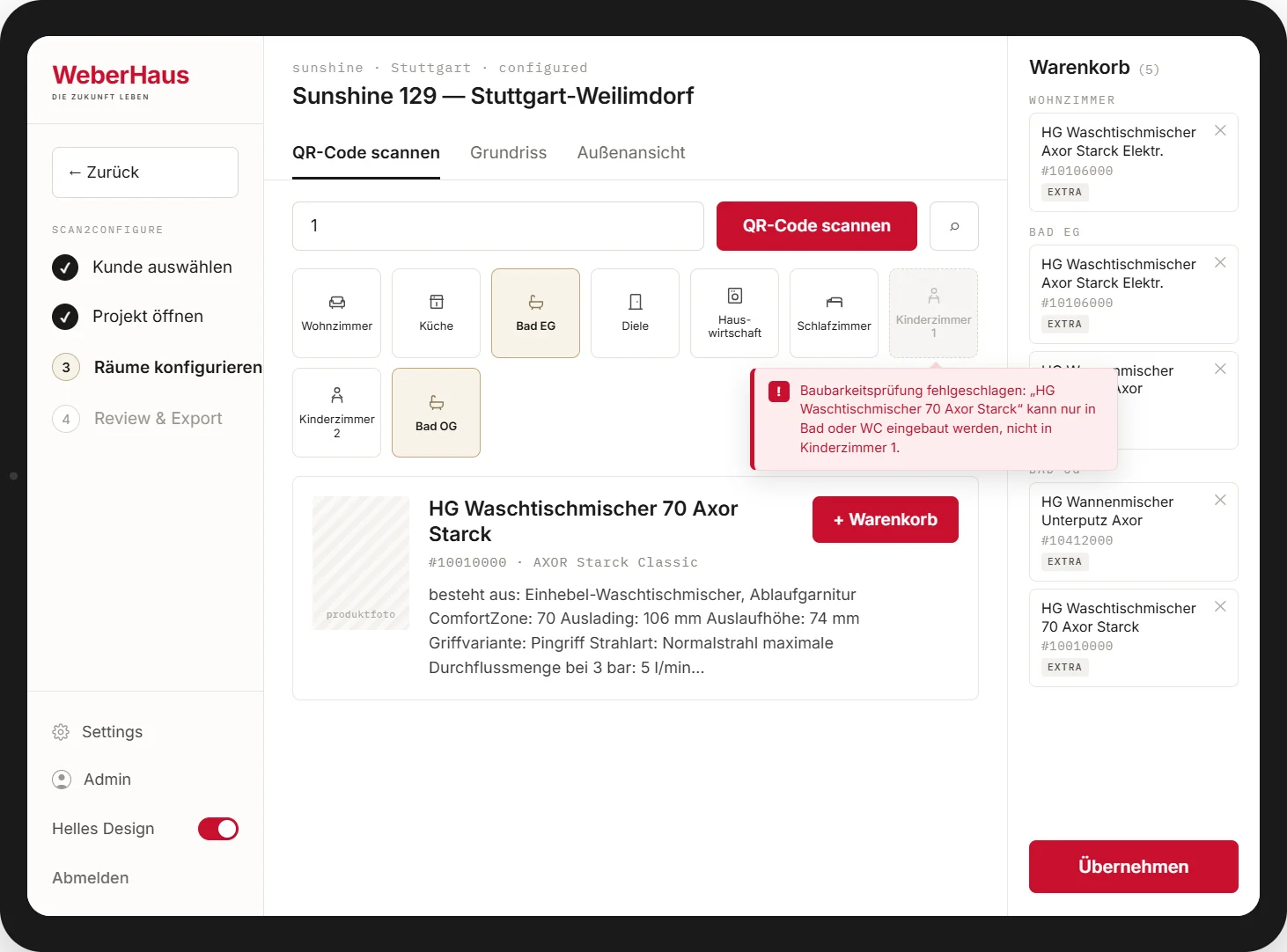
Under hackathon time pressure, coding and the interaction concept ran in parallel — the MVP was built while the concept was still taking shape, not after it. The result: implementation and UX concept drifted apart in several places.

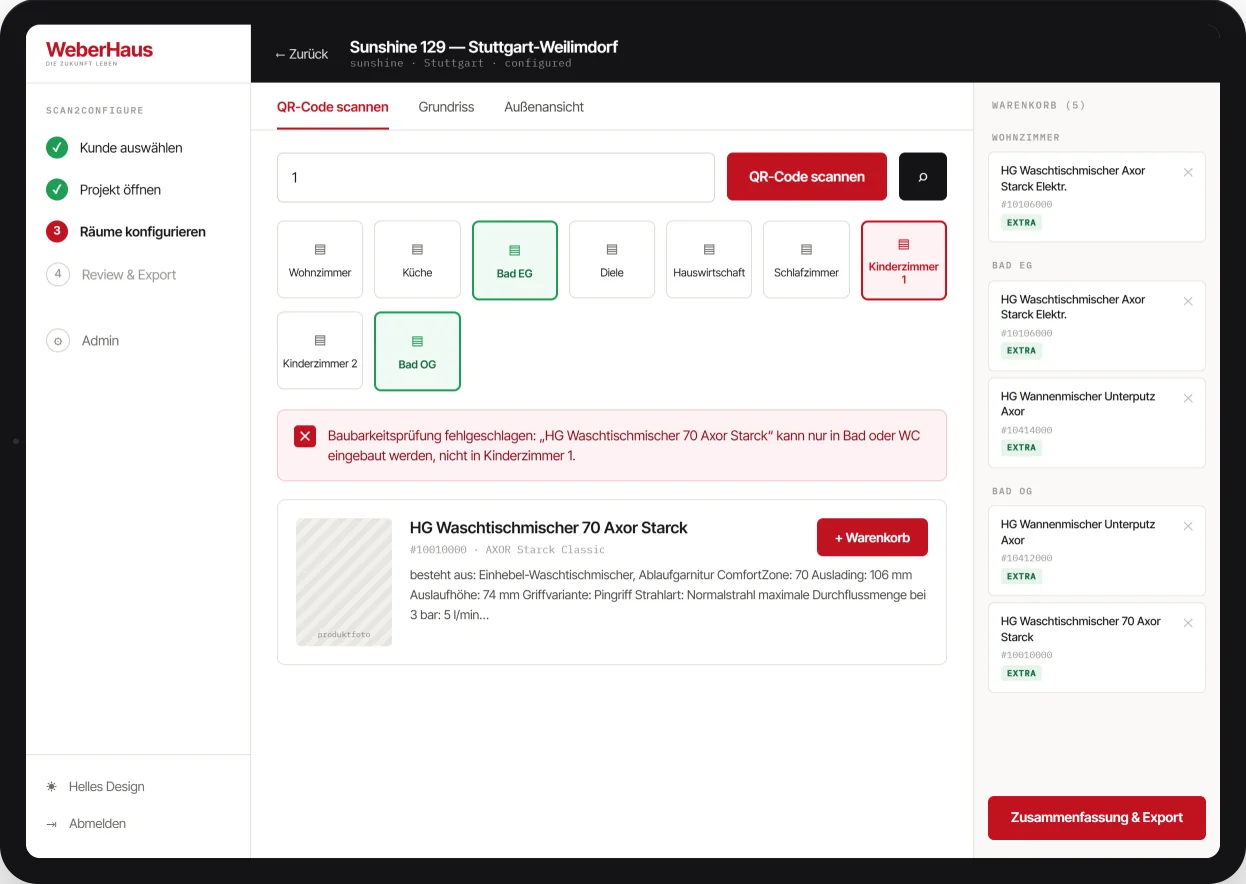
A rework wasn't possible before the deadline. So I ran a focused design review, prioritized the most critical deviations, and translated the key corrections into one reference screen — a concrete target for the intended interaction logic, without a full MVP rebuild.

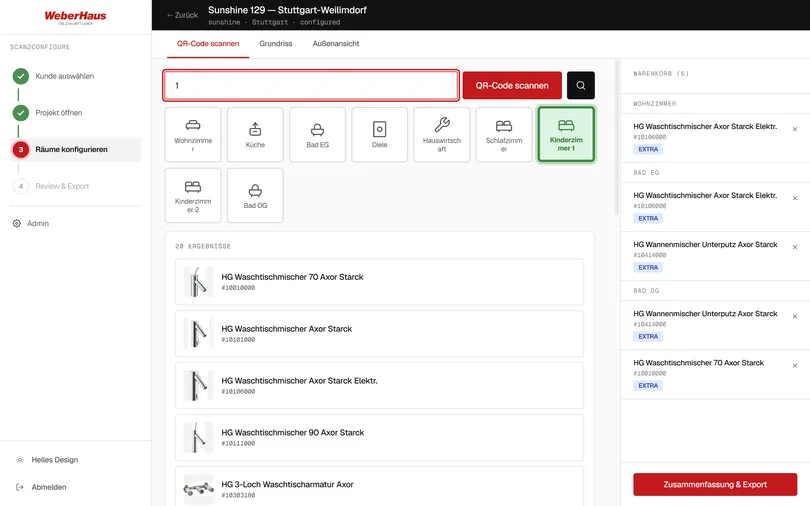
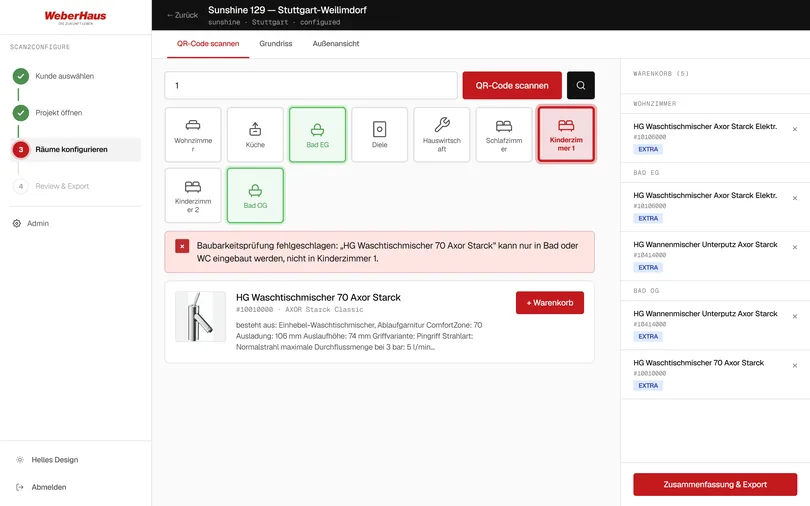
Finding01

Red and green used as generic interaction colors.

The MVP used red and green for selections and interactive elements regardless of system state, weakening both as status signals.

→ UX decision: red and green are reserved for error and success only — selection and interaction get a neutral hierarchy.

Finding02

Invalid options only became visible after selection.

Every room looked selectable; users only learned a room didn't fit the scanned item after choosing it.

→ UX decision: availability is checked as part of the scan — incompatible rooms are disabled immediately, so only valid options can be chosen.

Design refinement in progress: the mockup proves the interaction model — prevent invalid choices instead of explaining them afterward — the visual layer still needs to catch up with the design system: lighter contours, less weight, a calmer hierarchy. In progress

Coded MVP: red and green used as generic interaction colors, invalid room only flagged after selection
Before — coded MVP
Coding-MVP: Rot und Grün als generische Interaktionsfarben, ungültiger Raum erst nach der Auswahl markiert
After — Design-Review-Mockup

The Pitch

3 systems - 1 goal - 0 media breaks

Status quo → solution vision → live demo. Presented by Team HomeWork (Heinrich, Martin, Gilbert, Verena) to the hackathon jury.

> €633,000

wasted by today's process Estimate

„Consultation quality rises when technology works invisibly in the background."

Outcome

Impact & a concept ready for validation

Scan2Configure doesn't just solve the capture problem — it solves the real problem behind it: the laborious, error-prone post-processing. Deliberately without collected metrics; these statements are directional and backed by a proof of concept.

  • › Fewer errors — correct, complete data is created at the point of capture instead of during later retyping.
  • › Time savings — manual transfer into three systems is eliminated.
  • › Better consultations — the advisor stays in the conversation, has all data at the point of consultation, and works the object and the screen together.
  • › Improved user flow — fewer breaks, less error-proneness, lower cognitive load.
  • › Rethought processes — the workflows were rewritten, not just digitized.

A proof of concept supports that the system can deliver these improvements.

Proof of concept — a working scan-to-cart flow in the coded MVP

What was created

A concept and strategy package: product vision, competitive analysis, a prioritized feature roadmap (3 phases), and a scan-to-cart MVP concept with live dependency checking and three-system sync — plus a proof of concept. No production rollout.

What comes next

Sharpen the personas with real advisor and homeowner interviews, test the dependency logic against the real product catalog, and walk through the sync failure cases (WeKo/CAD/Designer) with the system owners — before building.

Product visionCompetitive analysisFeature roadmapPersona (proto)Scan-to-cart flowSync conceptProof of ConceptResearch backlog