UX Design · NDA · Pattern · Widget + Configuration Dialog

Workflow widget — it guides, but never blocks takt.

Guides workers step by step through every capture on the vehicle — in a fixed order, right in the reach zone. A stepper bottom-right of the workstation that never forces anyone, but never lets anything get lost either.

Vehicle → Capture → Check → Decision → Next step
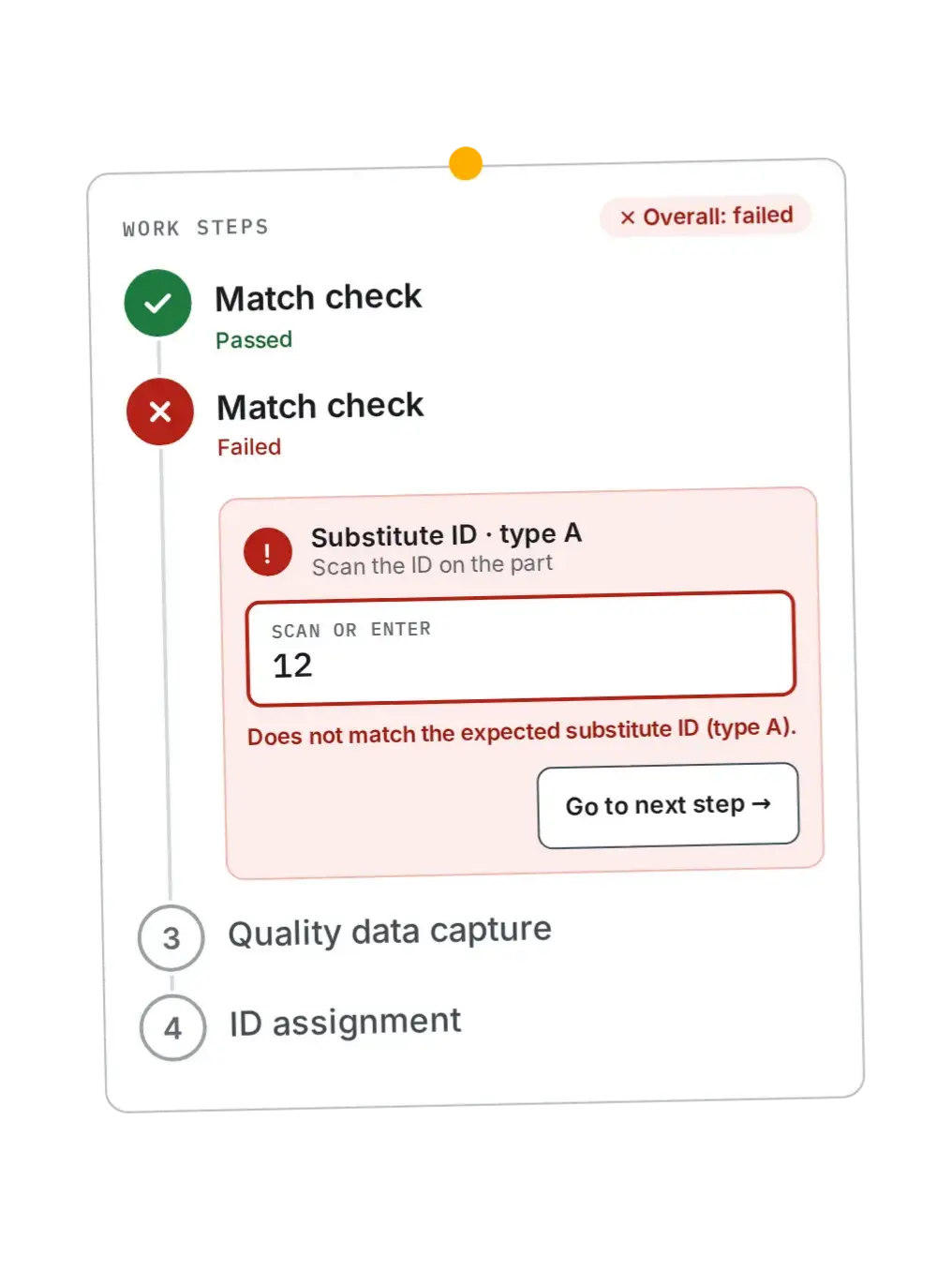
Workflow widget: work-steps card with a passed and a failed match check, an error message, and 'Go to next step'
Context

A stepper widget for several captures per vehicle.

Source: internal widget documentation, abstracted. This version (v2) replaces an earlier draft that assumed just a single check per vehicle.

Role
Design of the workstation widget and the configuration dialog
Scope
Capture stepper + configuration dialog (steps, order, check types)
Team share
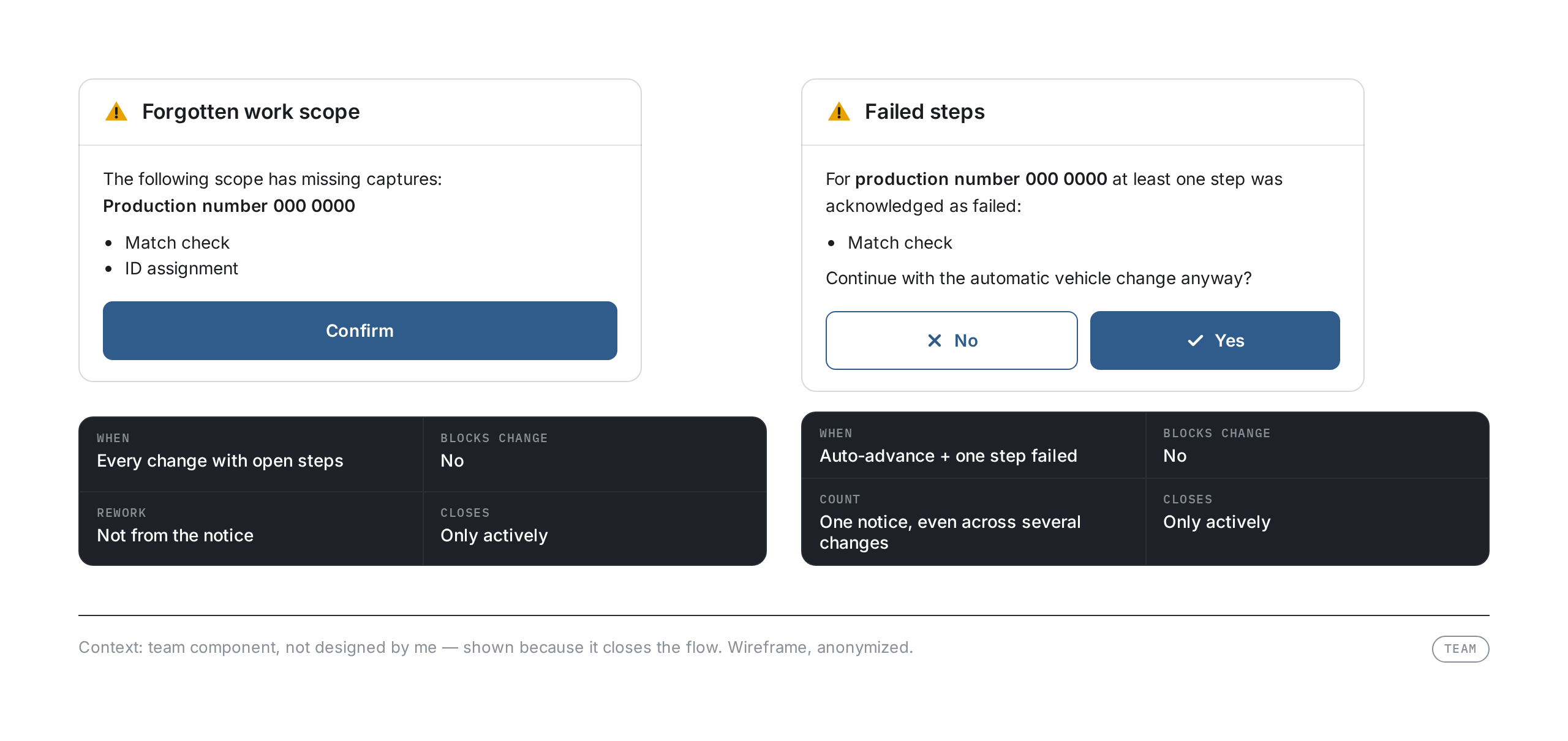
Vehicle-change notices — shown here for context only
Status
v2 · configuration-dialog screen still to follow
The Challenge

Several captures per vehicle — none can get lost.

Each vehicle needs several captures at a workstation: matching numbers, recording quality data, assigning IDs. Which steps, and in what order, depends on the workstation.

Without guidance, under takt pressure a step gets skipped or an error goes unnoticed. At the same time, a single failed step must not stop the line.

„I want to see what's next — and if something doesn't match, I still need to move on.“
— Assembly worker, paraphrased · [Assumption — to be replaced with a real, de-identified quote]
C-01 · Fixed order C-02 · Reach zone C-03 · Scan before typing C-04 · No standstill C-05 · Never color alone
Reframe

How might we guide several captures per vehicle so that nothing gets forgotten — without blocking takt?

States

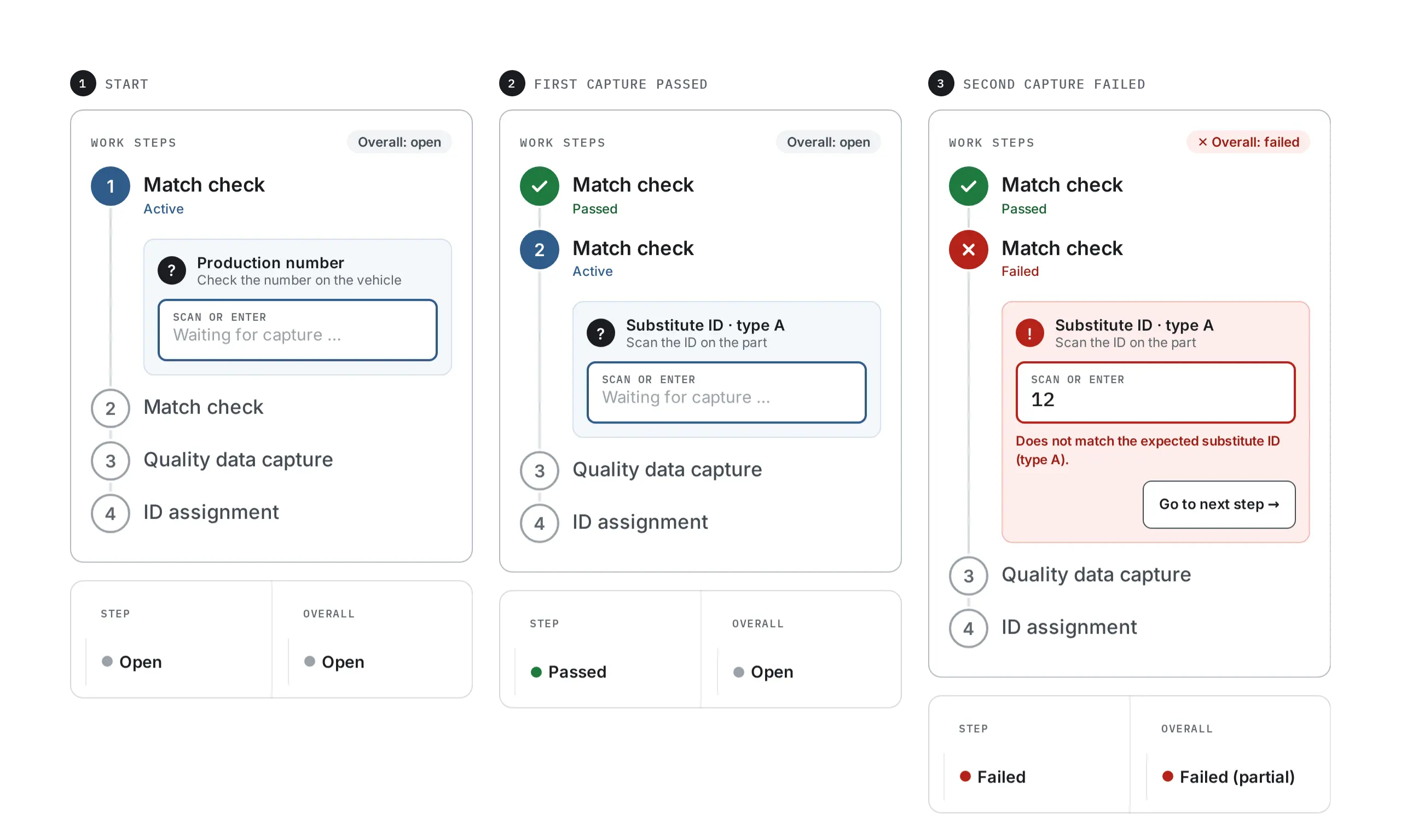
Every step is open, passed, or failed.

Every state is recognizable by symbol, word, and color — never by color alone.

Three states of a capture step — open, passed, failed — with the overall-status rule
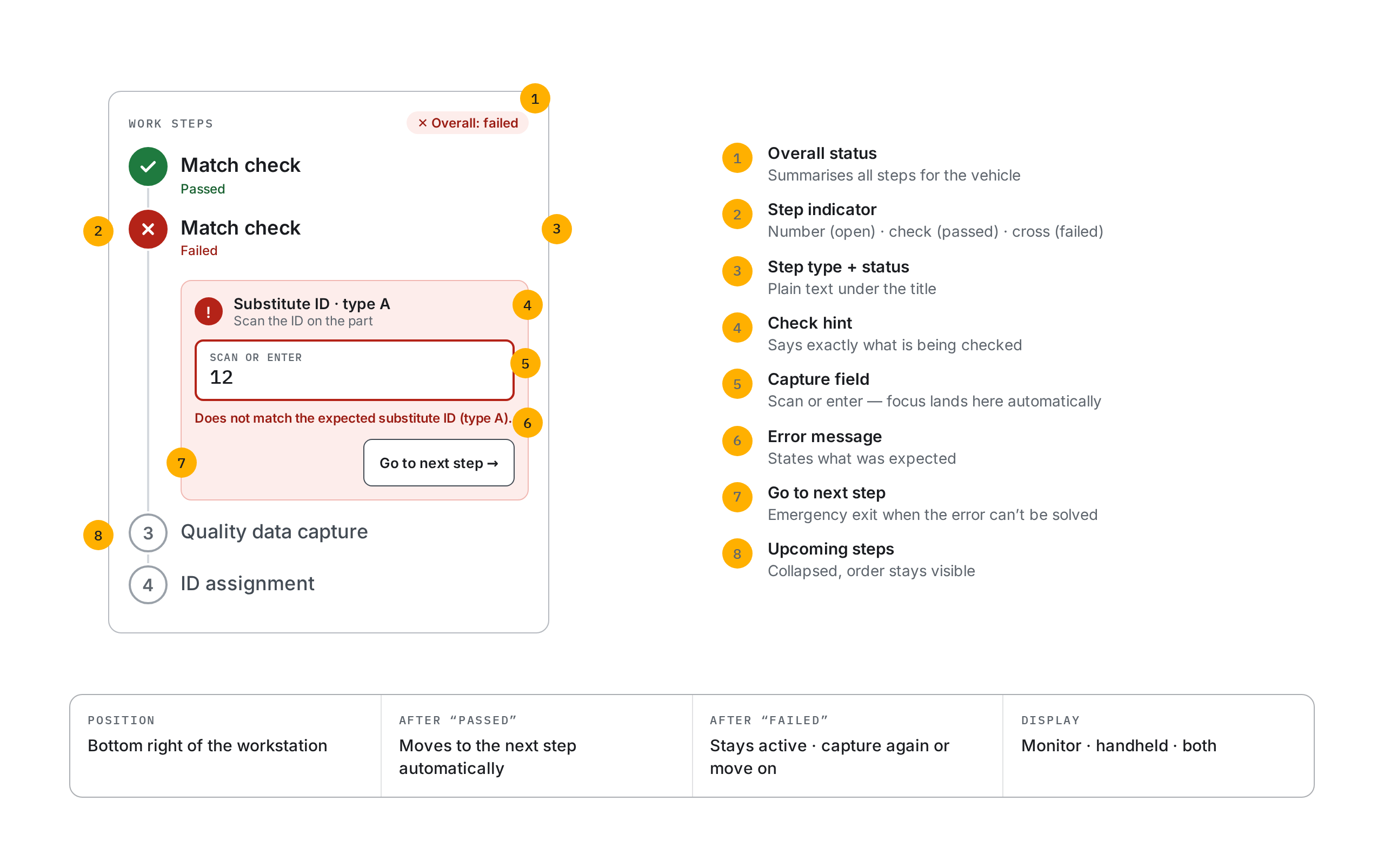
Anatomy

How the widget is built

Eight labeled elements of the widget: overall status, step indicator, step type, check hint, capture field, error message, move on manually, upcoming steps
Solution · Logic

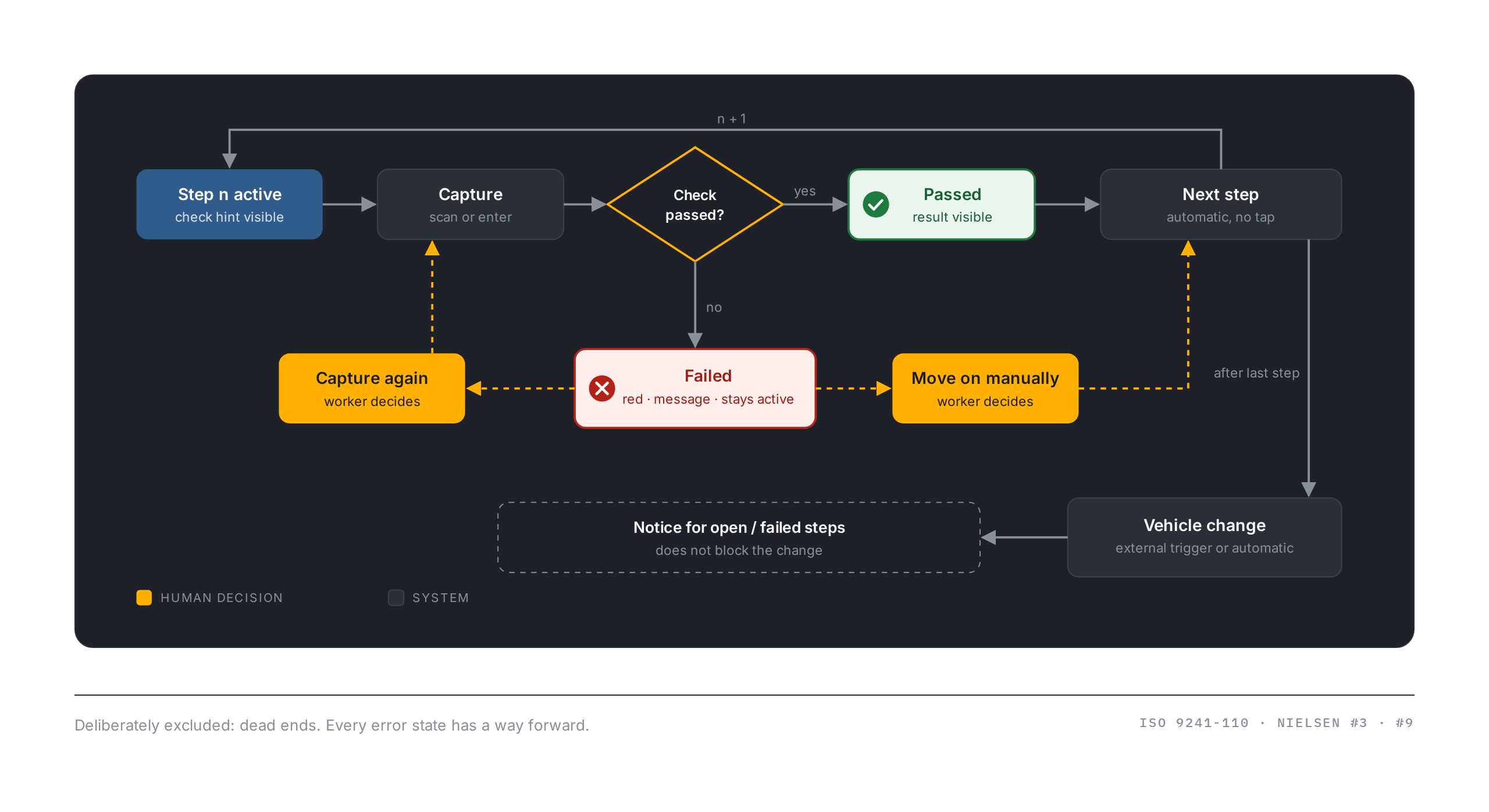
The system guides. The person decides on errors.

Passed steps move on without a tap. On an error the flow pauses — and the worker decides: capture again or deliberately move on.

Flow diagram: capture, check passed yes/no, on no capture again or move on manually, vehicle change possible independently of the outcome
Solution · Placement

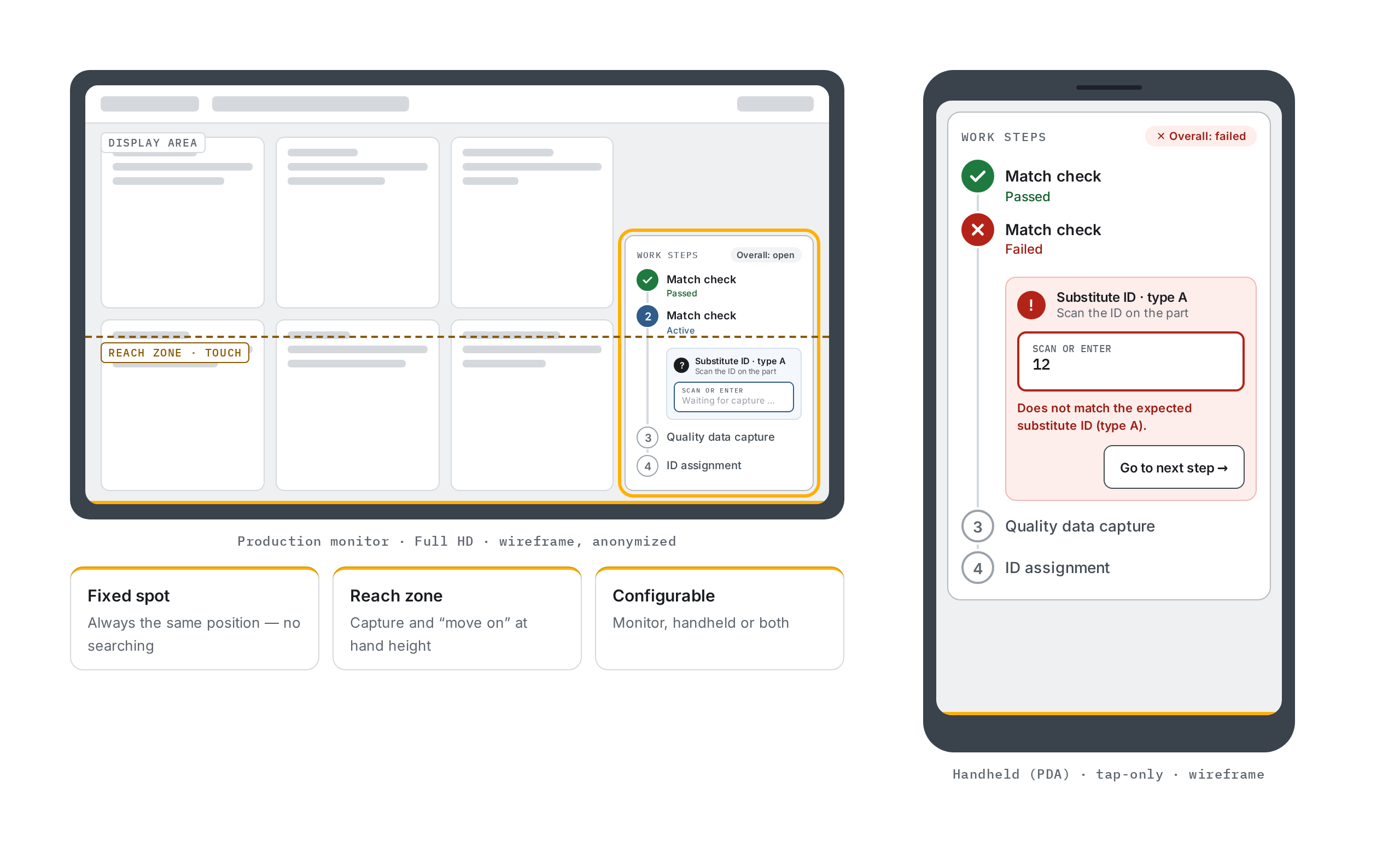
Bottom right — exactly where the hand reaches.

On the monitor the widget sits fixed in the lower right corner, inside the reach zone. On the handheld it takes the full width.

Widget placement on the production monitor (bottom right, in the reach zone) and on the handheld (full width)
Vehicle change

Notices that don't hold you up.

When the next vehicle arrives, a notice sums up what is open or failed. It has to be closed actively — the change still happens in the background.

Two notice dialogs at vehicle change: forgotten work scope and failed steps, each requiring active confirmation
Decisions

What stayed, what was cut — and why.

"Mine" = designed by me (widget, configuration dialog) · "Team" = product decision made by the team.

KeptMine
Auto-advance only on "passed"

Saves taps in the normal case; on errors the flow pauses so nothing slips through unnoticed.

KeptMine
"Failed": step stays active, red, with message

The error shows immediately and can be fixed in place — no restart of the flow.

KeptMine
"Move on manually" as emergency exit

Not every error can be fixed on the line; without a way out it would be a dead end.

KeptMine
Fixed spot bottom right

Inside the reach zone; same position at every workstation.

KeptMine
Order only via drag & drop in the configuration dialog

Positions are assigned automatically; reordering stays a deliberate action.

KeptMine
Configuration dialog: fields appear per step type and check type

Fewer fields at once, fewer misconfigurations — only what matters is visible.

KeptMine
Check pattern with a visual preview in the menu

Recognition over recall: checked and free positions are visible before choosing.

KeptTeam
Vehicle-change notice: close actively, but non-blocking

Forgotten scope must not go unseen — takt keeps running.

KeptMine
Rework after the change

Possible by manually paging back to previous vehicles.

CutTeam
Lock the vehicle change until all steps pass

Would have stopped the line; the decision stays with the person.

Rationale

Heuristics, standards, validation.

Heuristics & standards

Nielsen #1 · System status
Step and overall status always visible
Nielsen #3 · User control
"Move on manually" as emergency exit
Nielsen #5 · Error prevention
Fixed order + notice on forgotten scope
Nielsen #6 · Recognition
Check hint in the widget · pattern preview in the dialog
Nielsen #8 · Minimalism
Configuration fields appear only when relevant
Nielsen #9 · Recover from errors
Message states the expected value
ISO 9241-110 · Suitability for the task
Only the steps configured for this workstation
ISO 9241-110 · Error tolerance
Failed → capture again, no restart

Accessibility (WCAG 2.0 AA)

1.4.1 Use of Color
Number / check / cross + status text
1.4.3 Contrast (Minimum)
All text pairs ≥ 4.5:1 [to verify]
3.3.1 Error Identification
Error described in text, field marked
3.3.3 Error Suggestion
Expected value is named
4.1.2 Name, Role, Value
Steps as a list with status in the name

Research recommendation — next validation

No quantitative results claimed — metrics [not verified] until field data exists.

Project details anonymized under NDA · DSGVO · GeschGehG.